

Withdraw
How to withdraw spot assets from Hyperliquid.
Unit's withdrawal process is simple by design - mirroring the deposit process. Below is a step-by-step guide to withdrawals from Hyperliquid using BTC as an example. The same general process applies to all supported assets.
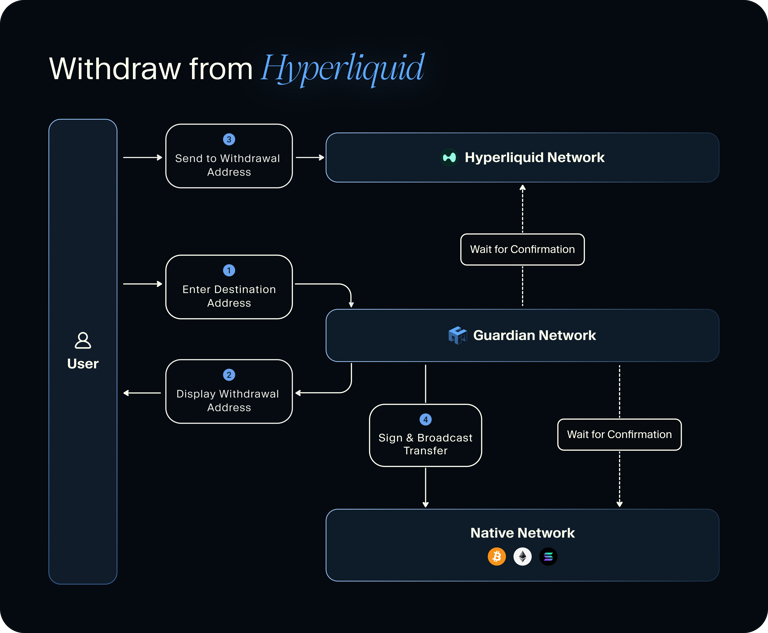
Mermaid comparison
How To Withdraw: BTC
Connect Wallet & Select Asset
Navigate to the Hyperliquid or Unit UI and connect your Hyperliquid wallet. In the "Withdraw" tab, select "Bitcoin".
Enter Destination Address & Amount
Enter the Bitcoin address to which you want to withdraw, and the desired BTC amount.
Similar to deposits, the Unit protocol will generate a unique "withdrawal" address on Hyperliquid, which is tied to the destination address you entered.
Submit Your Withdrawal
Click "Withdraw" and sign the transaction from your Hyperliquid wallet. This will transfer the BTC to the Hyperliquid address corresponding to your destination Bitcoin address.
Done!
Upon the finalization of the Hyperliquid transaction (~10 seconds), the Unit protocol will generate and broadcast the corresponding transfer to your address on the Bitcoin network.
You can monitor the progress of this transaction directly on Unit, or on Bitcoin explorers such as mempool.space. For other assets, you can use native explorers such as Etherscan, Solscan or Plasmascan to track your transfers.
For detailed information on how to withdraw using the Guardian Network, please visit the Developers section.