

Deposit
How to deposit spot assets to Hyperliquid.
With Unit, depositing assets into Hyperliquid is as simple as a transfer. Below is a step-by-step guide to deposits to Hyperliquid using BTC as an example. The same general process applies to all supported assets.
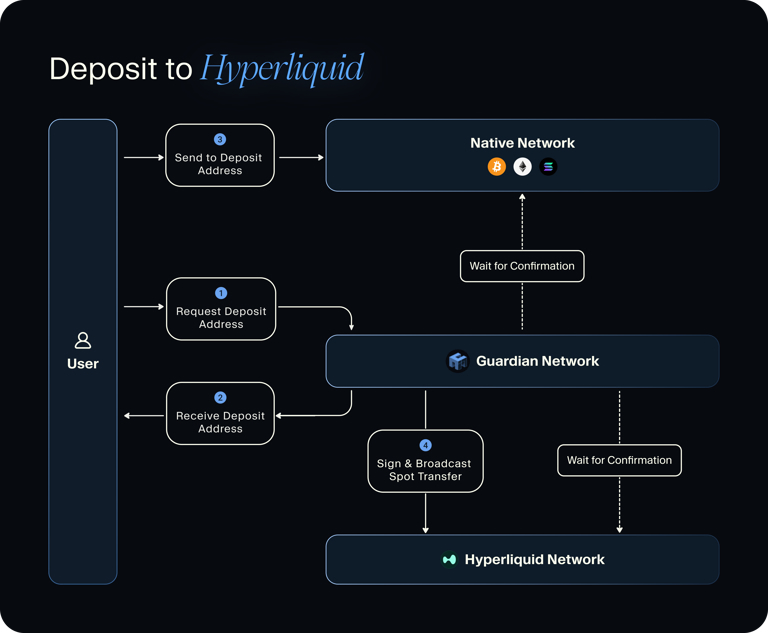
Unit deposit flow
How to Deposit: BTC
Connect Wallet & Select Asset
Navigate to the Hyperliquid or Unit UI and connect your Hyperliquid wallet. In the "Deposit" tab, select "Bitcoin".
Retrieve Deposit Address
Your unique Bitcoin deposit address will be displayed. This address was securely generated by Unit's MPC Guardian Network, and is permanently tied to your address on Hyperliquid.
The integrity of this address may be verified by its Guardians' signatures.
Transfer Asset
Simply transfer Bitcoin to your Unit Bitcoin deposit address, from wherever you hold BTC.
Done!
You can track your BTC transfer using a Bitcoin explorer such as mempool.space. Upon the finalization of this transfer on the Bitcoin network (2 block confirmations), the Unit protocol will transfer the corresponding BTC amount to your address on Hyperliquid.
For other assets, you can use native explorers such as Etherscan, Solscan or Plasmascan to track your transfers.
For detailed information on how to deposit using the Guardian Network, please visit the Developers section.